You’re probably reading this from a job you haven’t fully left in your head yet.
Maybe the work is fine, but growth has flattened. Maybe leadership changed. Maybe you’re carrying too much, learning too little, or realizing the next serious step in your career won’t happen where you are now. The problem isn’t deciding to look. The problem is doing it without creating a mess at your current job.
That concern is rational. It isn’t paranoia. A public search can trigger questions you didn’t want to answer yet, change how your manager reads your behavior, and complicate projects you still need to finish professionally. In tech, where teams are lean and visibility is high, even small signals can travel fast.
The safest job search is one that looks boring from the outside. No sudden profile theatrics. No work-device activity. No references that point back to your current manager. No recruiter calls hitting your phone while you’re walking into standup.
I talk to engineers who want a new role but hesitate to search because they assume secrecy makes them look disloyal. It doesn’t. It makes them realistic.
Those who explore new roles are often still employed. In fact, 85% of employed professionals actively exploring new opportunities are currently employed, which is exactly why confidentiality matters so much during a search, according to Underdog's guidance on searching confidentially. If you’re trying to figure out how to job search without your employer knowing, you’re not acting unusually. You’re operating like a professional who understands the risk of premature visibility.
A common mistake is treating job searching like a light administrative task. Update LinkedIn during lunch. Upload a resume to a few boards. Take a recruiter call between meetings. That approach creates a trail. Public resumes can be found. Profile changes can trigger notifications. Internal recruiters and employer networks can connect dots faster than most candidates expect.
The risk isn’t only termination. Sometimes the damage is softer and more annoying.
| Situation | What often happens |
|---|---|
| Your manager hears you're looking | You get pulled into an awkward retention conversation before you're ready |
| HR or internal recruiting sees your resume | Your intent gets interpreted before you've made a decision |
| Teammates notice profile updates | Your credibility on long-term work can take a hit |
| A recruiter calls your office line or work hours repeatedly | People start asking questions you didn't invite |
That’s why a stealth search is career management, not deception. You still do your job well. You still leave cleanly if you choose to leave. You control timing.
Practical rule: Don’t announce a search before you have leverage. Leverage means real interviews, real options, and enough information to make a decision on your terms.
There’s also a difference between being hidden and being strategic. Hidden means reactive and anxious. Strategic means you’ve decided what gets exposed, to whom, and when. If you want a useful framework for that mindset, confidential job search strategies for tech candidates are worth reviewing.
A stealth search works best when you assume discovery is possible and build your process so even if one piece slips, the rest of the system still holds.
A lot of candidates get exposed before they ever apply anywhere. It happens when a work laptop keeps browser history, a corporate VPN logs traffic, or an AI monitoring tool notices repeated visits to compensation pages, GitHub repos, and competitor job posts from the same device. Browser fingerprinting makes this easier than people realize because it can connect activity across sessions even if you clear cookies.
The practical answer is isolation. Treat your search like a separate system with its own device, accounts, browser, and habits.
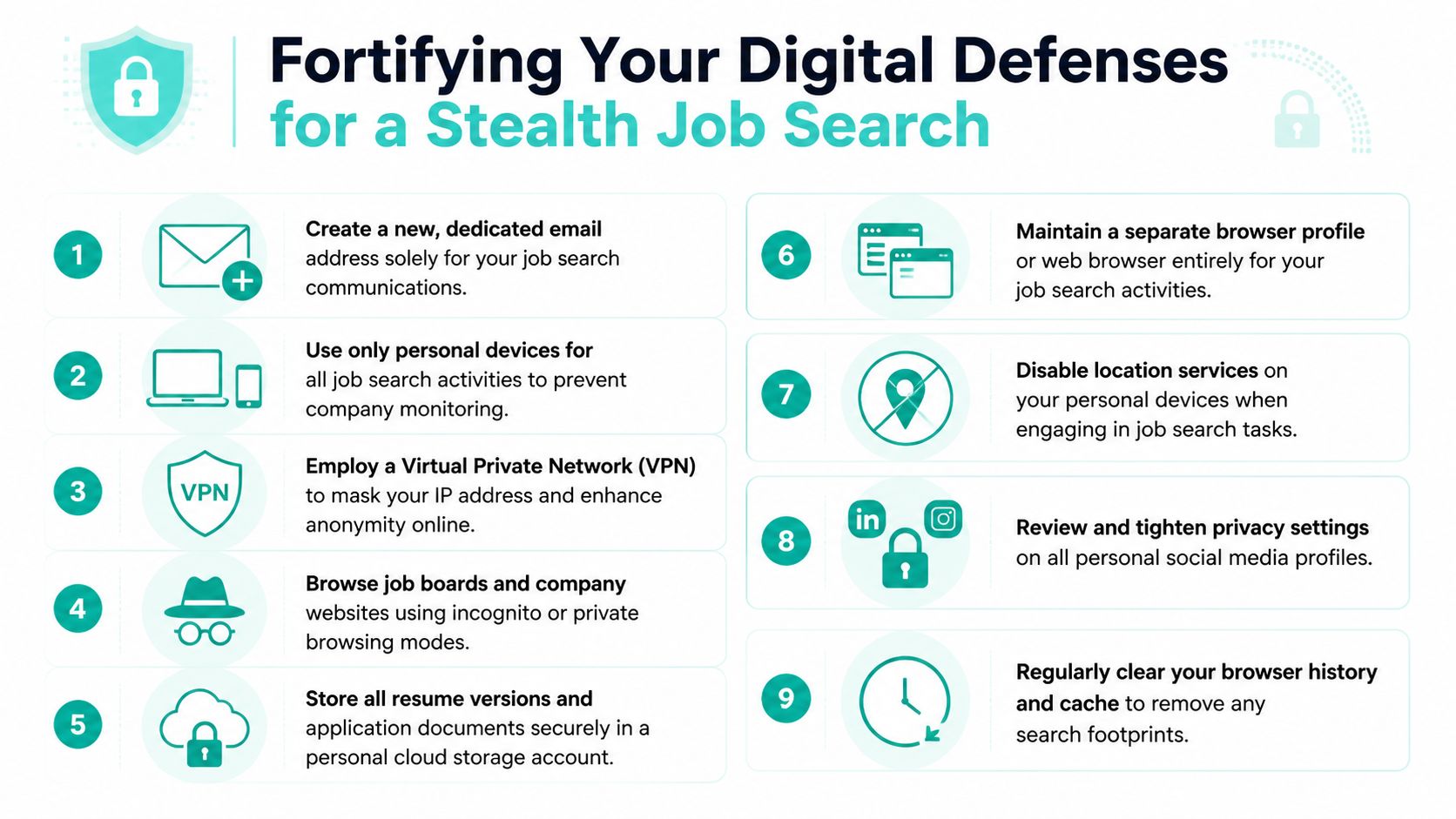
For engineers, I usually recommend a setup that assumes your employer can see more than you think.
That is the minimum. If your employer is security-heavy or already uses endpoint monitoring, use a personal device that never joins the company Wi-Fi.
The old stealth advice was mostly about LinkedIn settings. That still matters, but it is no longer enough. Recruiters, sourcers, and internal talent teams can connect identity through phone numbers, alternate emails, public profiles, and data broker records. AI tools make that matching faster.
Cleaning up your exposed personal data lowers that risk. The goal is not invisibility. The goal is to make cross-referencing slower, less certain, and less useful. A good starting point is this ContentRemoval.com information.
One trade-off is worth stating plainly. More privacy usually means more friction. A locked-down setup can make autofill, calendar syncing, and quick recruiter replies less convenient. That inconvenience is acceptable if it keeps your search separate from your employer’s systems.
Time separation matters, but infrastructure separation matters more. Sending an application at 9 p.m. from a company laptop is still a mistake. So is taking a recruiter call on your work headset through a company phone app.
Use this standard:
Curated, anonymous talent marketplaces are useful here because they remove a lot of the exposure points that come with open browsing and public profile activity. Instead of broadcasting interest across the internet, you let vetted employers review a controlled profile inside a system designed for confidentiality.
If someone reviewed your work machine, your corporate accounts, and your office call logs, they should see a normal employee doing normal work. That is the standard.
A confidential search can fail before you ever speak to a recruiter. One late-night profile overhaul, one spike in job-page visits tied to your browser fingerprint, or one public resume that names a sensitive migration, and you have created a pattern someone else can notice.
Your profile needs to do two jobs at once. It has to be credible enough for a recruiter or hiring manager to understand your value, and plain enough that a coworker, manager, or automated monitoring system sees routine maintenance instead of a search campaign.
Sudden changes attract attention. Quiet consistency does not.
On LinkedIn, keep the profile current in a way that reads like normal professional upkeep. Update your headline to reflect your function and scope, not your intent. “Staff backend engineer focused on distributed systems and reliability” is safer than anything that hints at wanting a move. Your About section should describe the kind of problems you solve, the scale you work at, and the teams you work well with. It should not read like a pitch deck for your exit.
A safer pattern looks like this:
That last point matters more than candidates think. Employers do not need a human being staring at your profile to spot unusual behavior. AI tools and third-party data providers can detect bursts of profile activity, cross-site job browsing, and matching identity signals across devices. A profile that changes gradually is less likely to create a clear event.
I usually advise engineers to maintain two versions of the same story.
The public version lives on LinkedIn and any profile that could be seen by coworkers. It should be accurate, useful, and slightly generalized. Mention that you improved reliability, reduced latency, led migrations, or built internal platforms. Do not name unreleased products, confidential customers, security controls, or roadmap details that make your current work instantly identifiable.
The private version is your recruiter resume. It can be more targeted because you control where it goes. Even then, use judgment. If your current employer would recognize a project from one line item, rewrite it at the problem and outcome level.
Here is the standard:
| Risky version | Safer version |
|---|---|
| Names the internal codename of a current initiative | Describes the system and business problem in plain terms |
| Lists unreleased roadmap work | Focuses on delivered results and technical ownership |
| Includes proprietary metrics tied to one team | Uses directional impact and scope without exposing sensitive data |
That approach protects confidentiality and usually improves your resume. Recruiters care about scope, complexity, and results. They rarely need the internal label your company uses.
LinkedIn privacy settings help, but they are not the whole answer. Public platforms are built for visibility. Confidential searches need controlled access.
That is why curated, anonymous marketplaces are useful. They let you share a structured profile with vetted employers without broadcasting fresh activity across the open web. For engineers in particular, that reduces the chance that your search gets inferred from profile edits, repeated company-page visits, or ad-tech tracking tied back to your identity.
Keep your records just as controlled. A private tracker helps you manage which version of your resume went where, which recruiter saw which email address, and where follow-up risk exists. This guide to tracking and organizing your job search is a practical way to keep that process tight.
If LinkedIn is still part of your search, use it with discipline. Save roles, track outreach, and avoid duplicate clicks and repeated visible activity. This systematic approach to tracking LinkedIn opportunities is useful because it supports consistency without pushing you into noisy behavior.
That is the right outcome.
A strong stealth profile gives recruiters enough context to reach out and gives your employer nothing obvious to question. If someone from work happens to glance at it, they should see a competent engineer who occasionally updates a profile, not a candidate preparing to leave.
Confidential searches often break down because candidates wait too long to set boundaries. They assume recruiters will naturally be careful. Some are. Some aren’t.
You need to tell people what confidentiality looks like before the process gets moving. Expert protocol requires using references only from previous employers and explicitly communicating your confidentiality requirements to recruiters before engagement, because contacting your current workplace is one of the clearest ways to expose your search, according to Polished Resumes on confidential job search protocol.
You don’t need a dramatic speech. You need one clean sentence.
Use something like:
I’m open to hearing about the role, but my search is confidential. Please don’t contact my current employer or use current-team references at any stage without my explicit approval.
That sentence does three things. It establishes boundaries. It signals professionalism. It tells the recruiter you know where searches usually leak.
If a recruiter resists that boundary, treats it as inconvenient, or pushes for current-manager validation early, step back. That’s not a process problem. That’s a judgment problem.
A lot of candidates expose themselves through convenience. They answer from whatever device is nearby, take calls whenever someone is free, and let scheduling sprawl across the workday.
Better approach:
Here’s a reply that works well:
Thanks for reaching out. I can talk before work, during a scheduled lunch break, or after hours. Please email first rather than calling unexpectedly, since I’m keeping my search confidential.
Don’t use your current manager. Don’t use your current teammate. Don’t assume “they probably won’t call yet.”
Use former managers, former peers, or trusted stakeholders from earlier roles. If you’re light on references, say so early and frame it clearly: your current search is confidential, and you can provide prior-role references now with additional references later in the process if needed.
A simple tracking system also matters once interviews start stacking up. You need to know who has what version of your resume, what boundaries you set, and which recruiter works with which company. A practical template for that is this job search tracking and organization guide.
The candidate who controls communication usually controls the process. The candidate who reacts to everyone else’s urgency usually creates the leak.
Interviewing is where stealth turns into choreography. They don’t get caught by one dramatic mistake. They get noticed because their routine changes in visible ways.

A good example is the engineer who suddenly starts blocking long lunches twice a week, takes calls from stairwells, and appears on camera overdressed for a normal work-from-home day. None of those things proves anything, but patterns invite questions.
Treat interview scheduling like operational planning, not improvisation.
A phone screen fits best before work, after work, or during a genuine off-site break. A longer panel interview is usually cleaner on a work-from-home day or a half day of PTO. Half days often draw less attention than a string of full sick days because they look like normal life admin: dentist, repair visit, family appointment, paperwork.
If you need an in-person meeting, don’t leave the office in interview attire if that’s unusual for your workplace. Bring a change of clothes or choose neutral clothing that works in both settings.
Video interviews create their own tells. Background matters. Noise matters. So does calendar naming.
Use a neutral room at home or book private space somewhere you control. Don’t take a serious interview from your parked car unless there’s no alternative. It looks rushed because it is rushed.
A few practical reminders:
The safest interview plan is the one that still looks normal if someone only sees the edges of it.
You don’t need an elaborate cover story for every absence. You need fewer absences, better timing, and no sloppy signals.
A lot of stealth searches fail for a boring reason. The candidate is careful, but the system they are using is not.
Public job boards, employer ATS portals, recruiting CRMs, browser cookies, email trackers, and enrichment tools all create small traces. On their own, those traces may look harmless. In aggregate, they create a pattern. Modern hiring software can connect profile views, repeated logins, resume uploads, device signals, and recruiter activity faster than many candidates realize. If your employer uses aggressive monitoring, even unrelated behavior can start to form a picture.
That is why platform choice matters. A safer search is not only about discipline. It is also about reducing how many systems ever see you.
A confidential marketplace changes the mechanics of the search. Instead of creating accounts across multiple employer systems and spraying your resume into the open market, you keep one private profile inside a restricted network and let vetted companies request access through that channel.
That cuts risk in a few practical ways:
| Public job board model | Confidential marketplace model |
|---|---|
| Your activity spreads across many vendor systems | Your profile stays inside one controlled platform |
| Resume databases can become searchable or exported | Access is limited to approved employers |
| Repeated applications create repeated data trails | One profile supports targeted introductions |
| Tracking scripts and browser signals multiply across sites | Fewer platforms means fewer signals to correlate |
This matters more now than it did a few years ago. Privacy settings on LinkedIn still help, but they do not address browser fingerprinting, cross-site tracking, AI-based candidate matching, or recruiter tools that enrich partial data. The safer move is to limit the number of places where your search exists at all.
If you are targeting startups, confidential careers through Underdog use that narrower model. Your profile is private rather than publicly posted, and the platform blocks current and past employers automatically. That setup is useful for engineers who want signal from serious companies without creating wide market visibility.
I like this approach for candidates who are still employed because it addresses the main failure point. It is rarely one dramatic mistake. It is accumulated exposure across too many tools, too many logins, and too many people.
Confidential platforms do not remove every risk. References can still leak. A recruiter can still be careless. An interview process can still create scheduling pressure. But reducing your footprint at the top of the funnel gives you fewer systems to monitor, fewer opportunities for accidental disclosure, and fewer chances for your search to become legible to the wrong audience.
Fewer platforms usually means fewer traces, and fewer traces are harder to connect.
Don’t panic and don’t overexplain. If you’re not ready to disclose, keep your answer professional and narrow. Say you’re focused on your current responsibilities and prefer not to discuss career speculation casually. If you are actively deep in process and expect a transition soon, decide in advance whether honesty helps more than deflection in your specific relationship.
No. Don’t use work-provided phones for search communication, even for something small. Small messages create records, previews, notifications, and habits. Keep all scheduling on personal devices only.
Proceed carefully. Ask directly whether they recruit for your company or maintain a close relationship with its hiring team. If they do, either decline or state your confidentiality boundaries immediately and keep details minimal. When the relationship overlap feels uncomfortable, trust that instinct and move on.
Usually not. Even well-meaning coworkers create risk because they now have information that can leak through stress, gossip, or misplaced concern. If you need support, tell someone outside your current company.
No. That usually creates pressure and leads to rushed decisions. A confidential search works best when you still have time to evaluate roles carefully, set boundaries, and leave professionally if the right opportunity appears.
If you want a lower-exposure way to explore startup opportunities, Underdog.io offers a curated marketplace where candidates can create one profile and be considered by vetted companies without putting a public job search trail out into the world.